AI ENGINEERING · MCP ARCHITECTURE
Building an MCP Server with Node.js:
Connect AI to Real-World APIs
How does MCP connect AI to real-world systems?
A large language model can generate responses from its available knowledge, but it cannot directly access every external system. The Model Context Protocol (MCP) provides a standardized way for AI applications to communicate with external tools and resources.
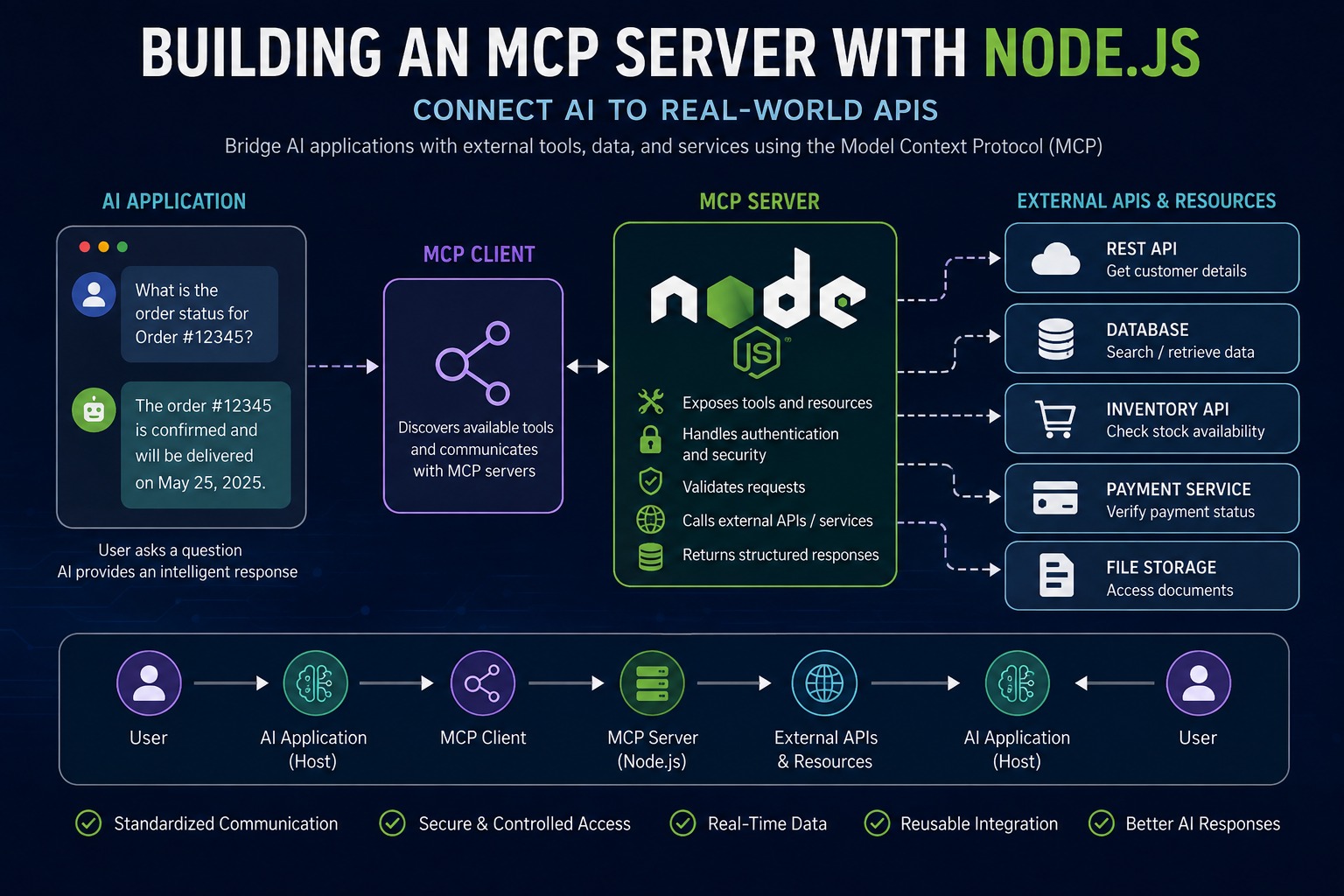
An MCP server acts as a bridge between an AI application and systems such as APIs, databases, files, and business applications. When the AI needs information from a connected system, it can use an MCP tool. The server communicates with that system and returns the result.
MCP allows AI applications to work with current information from connected services.
What is an MCP server?
An MCP server is a program that exposes tools, resources, and other capabilities for an MCP client to discover and use. A Node.js server can provide capabilities such as calling external APIs, searching databases, retrieving customer information, checking inventory, and accessing business data.
The server manages communication with external services while the host application and its MCP client coordinate how those capabilities are presented to the model.
What are the main components of MCP?
An MCP architecture separates responsibilities across the host, client, and server.
• MCP Host — the AI application where the user interacts with the model.
• MCP Client — the protocol component that maintains communication with an MCP server and exposes the server's capabilities to the host.
• MCP Server — the component that exposes tools and resources and communicates with external systems.
The MCP Client: the missing link
The MCP client is more than a network connection. It provides the controlled interface between an AI host and an MCP server. It establishes a transport, negotiates or discovers the server's capabilities according to the supported protocol revision, sends MCP requests, receives structured results, and manages the connection lifecycle.
A typical workflow is:
User → AI Host → MCP Client → MCP Server → External API → MCP Client → AI Host → User
This separation keeps model interaction, protocol communication, and external business logic independent.
Understanding the MCP Client
What does an MCP client actually do?
A client connects a host application to one MCP server at a time and provides the operations required to discover and use that server's capabilities. In a TypeScript implementation, the high-level Client class works with a pluggable transport.
• Connection management — creates and closes the protocol connection.
• Capability discovery — obtains the tools, resources, prompts, and capabilities exposed by the server.
• Tool execution — sends a tool name and validated arguments to the server and receives the result.
• Resource access — requests resource data when the host needs additional context.
• Prompt access — retrieves server-provided prompt templates when supported.
• Error handling — surfaces protocol, transport, validation, and server-side failures in a structured form.
How does the client connect to a server?
The transport is the communication layer used by the client. For local integrations, stdio is commonly used when the client launches the MCP server as a child process. For remote servers, Streamable HTTP is the modern transport supported by the current TypeScript SDK. Legacy HTTP+SSE remains relevant only for compatibility with older implementations.
The connection lifecycle should be treated as a managed resource: create the client, configure the transport, connect, perform discovery and operations, handle failures, and close the client when the application shuts down.
How does tool discovery work?
After connecting, the client can request the server's available tools. Each tool should expose a clear name, description, and input schema. The host can provide that metadata to a model so the model can decide whether a tool is appropriate for the user's request.
A simplified decision flow is:
User request → Model identifies a required capability → Host asks MCP Client to call the selected tool → Client sends MCP request → Server executes the tool → Client returns structured result → Model generates the response
Why is this separation important?
The model does not need to know how an external API works. The server owns API credentials and business logic, while the client owns protocol communication. This separation reduces coupling and makes it easier to replace a server, change a transport, or connect the same server to different compatible hosts.
Building an MCP Client with Node.js
Current TypeScript SDK approach
The current MCP TypeScript SDK v2 provides a dedicated client package. A basic client consists of a Client instance plus a transport. For a remote MCP endpoint, StreamableHTTPClientTransport can be used; for a local Node.js process, StdioClientTransport can spawn the server and communicate over stdin/stdout.
import { Client, StreamableHTTPClientTransport } from "@modelcontextprotocol/client";const client = new Client({ name: "node-mcp-client", version: "1.0.0"});const transport = new StreamableHTTPClientTransport( new URL("http://localhost:3000/mcp"));await client.connect(transport);
Discover and call a tool
Once connected, the client can list the tools exposed by the server and invoke a selected tool with the required arguments.
const tools = await client.listTools();console.log("Available tools:", tools.tools.map(t => t.name));const result = await client.callTool({ name: "get_customer", arguments: { customerId: "CUST-1001" }});console.log(result);
The client should not embed the server's private API key. If get_customer requires authentication, the server should use its own protected credentials when contacting the business API. The client receives only the information that the server intentionally returns.
Local stdio client
For a local server process, the client can use StdioClientTransport. The transport starts the child process and communicates with it through standard input and output.
import { Client } from "@modelcontextprotocol/client";import { StdioClientTransport } from "@modelcontextprotocol/client/stdio";const client = new Client({ name: "local-mcp-client", version: "1.0.0"});const transport = new StdioClientTransport({ command: "node", args: ["server.js"]});await client.connect(transport);
The important design principle is that application code talks to the MCP Client API instead of manually constructing protocol messages wherever possible. This keeps protocol details in one controlled layer.
Working with more than tools
A capable client can also use listResources and readResource for contextual data, and listPrompts and getPrompt for server-provided prompt templates. These operations allow the host to combine structured business actions with contextual information.
Reliable MCP Client Design
How should errors be handled?
Failures can occur during connection, capability discovery, argument validation, transport communication, or tool execution. A production client should distinguish these cases so the host can provide a useful response instead of hiding the original failure.
• Connection failure — verify the endpoint, process command, transport configuration, and server availability.
• Invalid arguments — validate required fields before sending a tool call.
• Authentication failure — keep credentials outside model-visible input and report authorization failures clearly.
• Tool failure — preserve the server's structured error information when possible.
• Timeout or network failure — apply bounded timeouts and retry only operations that are safe to retry.
Security considerations for MCP clients
• Treat tool descriptions and returned content as untrusted input; do not assume a tool result is safe merely because it came through MCP.
• Request only the capabilities the host actually needs.
• Use secure transport and appropriate authorization for remote servers.
• Do not place API keys, access tokens, or passwords in prompts, tool arguments, logs, or model-visible messages unless there is a specific security design for doing so.
• Require explicit user confirmation for high-impact actions such as payments, destructive changes, or sensitive data operations.
How should an MCP client be tested?
Testing should cover the complete host-to-client-to-server workflow rather than only testing a single function.
• Connection testing — confirm that the client can establish and close the transport correctly.
• Discovery testing — verify that expected tools, resources, and prompts are visible.
• Tool-call testing — verify correct names, arguments, results, and error states.
• Failure testing — simulate unavailable servers, invalid inputs, authentication errors, and timeouts.
• Security testing — verify that secrets are not exposed and sensitive operations are appropriately controlled.
What is the main advantage of an MCP client?
The MCP client gives an AI host a consistent protocol boundary for connecting to MCP servers. Instead of building a separate integration mechanism for every external service, the host can use standardized client operations while each server owns its own business logic and external-system integration.
Conclusion
An MCP server connects AI applications to real-world tools and services, while the MCP client provides the controlled communication layer between the host and server. A well-designed Node.js client manages transport, capability discovery, tool execution, resource access, errors, and lifecycle concerns without exposing server-side credentials.
The key principles are simple: keep responsibilities separated, use the appropriate transport, discover capabilities before using them, validate inputs, protect credentials, handle failures explicitly, and test the complete workflow. With these practices, MCP clients can make AI applications more reliable, reusable, and easier to integrate with real-world systems.